Daily Tips Ndtricks

  • Subscribe to our RSS feed.
  • Twitter
  • StumbleUpon
  • Reddit
  • Facebook
  • Digg

Thursday, 12 September 2013

How To Get More Done With An IPhone

Posted on 06:06 by Unknown
Best Iphone apps for life
Bet you didn’t know that your swanky new iPhone could actually change your life? Whether you are a disorganised mess or someone who prides themselves on their incredible tenacity and organisation, there will be an app to help you.

The great thing about the iPhone is that there are so many apps to help you in life. From shopping and fitness to online banking and organisation. So, here are a few of the best iPhone apps out there to help you get more done.

1) Remember the milk:

The very aptly titled app allows you to take your tasks anywhere you are. You can complete the tasks you set up for yourself and check them off on your app, order them according to work, home, school or personal, add priority and plan your day better. Dates, times, lists and so much more. And what makes it even better is that it is a free app!

2) A Personal Assistant:

Do you have hundreds of accounts with passwords and usernames? Struggling to keep up with them all? Then you need A Personal Assistant. This helpful app allows you to access and manage all of your online accounts in once place. A free app that adds your bank accounts, social media accounts and even Amazon and Netflix account details in one place. Worried about your iPhone getting stolen? Well, firstly make sure you have iPhone insurance, but you should also note that this app uses 128 bit SSL encryption which essentially means that you can remotely disable access should your iPhone get lost or stolen.

3) iTimeSheetLite:

If you need to keep track of hours worked on projects, billable hours or notifications regarding work then you need the iTimeSheetLite. This free app allows you to add a task, insert it into your calendar, select if the task is billable, set the task start and end time and add notes. There is also a more advanced version for $5.99.

4) Any.do

If you love a list then you will love Any.do. List-making and task-management is what it does best. It is ideal for organizing your calendar and assigning work tasks, travel and even shopping. It is also another free app.

5) Dragon Dictation:

If you don’t have time to transcribe your notes then don’t worry, Dragon Dictation will do it for you. It will transcribe whatever you speak and it is pretty darn accurate too. So, even if you can’t be bothered to type your next tweet, you can just tell Dragon Dictation and it will do it all for you.

There is a whole world of organisation out there for you to get on board with. Gone are the days of sticky post-it notes adorning your desk or a filofax that is falling apart at the seams. Just a bunch of amazing, and mostly free, apps that will get your life on track.

Why not head to the app store now and check out a few of these apps? Why not opt for the free ones first? You have nothing to lose.

Image Credit: sippakorn.


Author Bio:

Bill Turner lives with his dog on the South Coast of the UK, long walks, gadgets and technology, that's the life.
Read More
Posted in apps, iphone apps | No comments

Wednesday, 11 September 2013

Best Smartphone Apps for Road Trips

Posted on 07:20 by Unknown

Best Smartphone Apps for Road Trips
You're excited to pack up the kids and the car for a trip, but which apps will help you save time, money and hassle? What about finding things to do along the way? This list will get you started.

Google Maps:

It's pretty much a given that you're using Google Maps if you own an Android phone. You can set your home, look up businesses in a location, get directions by car, foot or public transportation and check into places once you arrive. Google Maps now included information such as hours of operation for businesses, which is great when you head out of town.

GasBuddy:

This app can literally save you money on your road trip by helping you to find the cheapest gas stations around. You know how expensive it might be to fuel up at a truck stop gas station right off the highway, and GasBuddy can take you directly to the station that will be nicest to your wallet. You can also log on to GasBuddy's website, which is mobile friendly. If you're interested in helping the community, make sure to update prices from your local gas stations.

TripAdvisor:

If you're going to need a hotel to stay at, the review system from other users on TripAdvisor is a boon. Aside from hotel information, you can find recommendations for hotels and local attractions if the family it looking a little bored with your itinerary. You'll find that the app is less cluttered than some alternatives, so it's easier to find exactly the information that you want.

RoadTripBingo:

You probably remember playing the license plate game as a kid when your parents were behind the wheel, so why not offer something for your children to do as you drive across the state or country? RoadTripBingo is that app, which encourages youngsters to find various items as you drive and then shake the device to clear the screen. Even Mom and Dad might get in on the fun.

Roadside America:

Perhaps you're the type of person who cares more about than the journey than the destination. If that's the case, check out Roadside America, an app that points out the crazy tourist destinations along the way that you may have missed if you simply stuck to GPS. You can subscribe to any or all of the six regions, which offer over 6,000 attractions from balls of twine to the world's largest six pack (of beer). Roadside America includes user reviews, so you know what to skip. Addresses, prices and other helpful information are offered in this app and on the Roadside America website.


Of course, plenty of other apps exit. Yelp and UrbanSpoon offer reviews of restaurants and other businesses that you might frequent while on vacation, and OpenTable allows you to make reservations for your party. If you're planning to cross borders, iTranslate can help you get over the language barrier, too. Most of these apps are free, so don't feel bad if you don't love them.


Related Articles:

  • Make Your Road-Trips Exciting With These Apps.
  • Top Travel Apps For Android Mobile Phones.


Image Credit: digitalart.
Read More
Posted in android apps, apps, iphone apps | No comments

Tuesday, 10 September 2013

Using The Internet To Protect Your Home

Posted on 07:15 by Unknown
Using The Internet To Protect Your Home
The Internet has grown to allow us to do wondrous things. We can communicate around the world in a matter of seconds and complete work entirely online. Today the Internet also allows people to add extra security to a home. Home security has forever changed with the advent of the Internet. People can monitor what is taking place inside their home to figure out whether or not danger is present at any given time. A homeowner can use the Internet to provide added safety to her home to feel more secure and protect all loved ones and guests.

Install Surveillance Cameras:

Surveillance cameras are used to monitor both the inside and outside of a home. Did you know that you could hook up your camera to the Internet? If you have a smartphone, you can link your camera's live feed directly to your phone. This means that you can monitor all activity going on in your home at all times. All you need is access to the Internet and you will have the ability to stream from your home surveillance camera. Cameras can also have saved recordings downloaded to a server. It does not matter if someone destroys your camera or home computer. Since the live feed can be recorded and saved to an outside server, there will always be evidence if a criminal breaks into your home or causes you harm. Surveillance cameras have played increasingly large roles in investigations in the past.

Power Outage:

Certain home security companies understand that if there is a power outage you could be left vulnerable. Technologically advanced home security systems are connected to the Internet to allow security companies to monitor the status of your home at all times. There are backup plans available to remain connected via satellite, even during a power outage. Refer to your home security company to see if this option exists in your area. You never know when the power is going to go out, and you don't know when it will return. It's a good idea to protect your home and family with a backup home security plan just in case the power goes out.

Silent Call for Help:

In the case of an emergency you might not have time to make a phone call to 911 or someone you know. You could be hiding from a burglar and as a result unable to talk on the phone. With smartphones you are connected to the Internet and can instantly inform people you are in danger. Social media allows you to Connect to thousands of people at once. There have been many scenarios where someone has used the Internet to let people know he or she is in danger. The Internet connects extremely fast so people have the ability to respond within seconds.

Internet Connected Devices:

Home security systems do not have to be connected to a landline anymore. Security systems exist that can connect to your home Internet through a wireless connection. You can connect your phone to the device and complete a variety of actions from your phone. You can set your alarm or turn it off if someone needs to enter your home. This type of home security system is definitely worth a look for an alternative form of home security.

Image source: SmartPhotoStock.


Author Bio:
Guest writer Leyland Suzuki and Denver, Colorado native loves blogging about home improvement and sharing his tips with an online audience. He is currently consulting with local Denver roofers to better secure his home.
Read More
Posted in Online Tips, Security Tips, Tech | No comments

How To Make Best Use Of Social Media

Posted on 06:25 by Unknown
We live in the 21st century when our lives are more and more defined by an online presence. Whether it be a Facebook account in which you share every little bit of information about your life or whether you need to update your daily activities every minute by posting on Twitter, social media is an integral part of our lives. As a company, this huge online world, is an area that can be exploited and used to improve your business in many different ways.

A study of the average age distribution across social networks would make interesting reading for any business as you can plot where to market your product and whether it is worth it. If, for example, you only sell hearing aids and your best customers are the elderly, then maybe social networks wouldn’t be useful for your business as the study shows only 3% of users on social networks are over 65. But if a recruitment company is looking at finding someone between the working ages of 17 and 65 then you can market to a whopping 81% of all Facebook users and amongst the millions, get your perfect candidate.

For more information on using social media in business then see our infographic.


How To Make Best Use Of Social Media

Read More
Posted in Infographics, social media, Tech | No comments

Monday, 9 September 2013

2013′s Best Apps for Lawyers

Posted on 08:47 by Unknown


2013′s Best Apps for Lawyers

Every year, lawyers rely less on pen and paper and more on digital devices. The ABA Legal Technology Resource Center estimates that 91 percent of lawyers use a smartphone. With this growing smartphone usage in the industry comes its own ecosystem of apps for legal use—some of them made for the average consumer and others tailored specifically for lawyers.


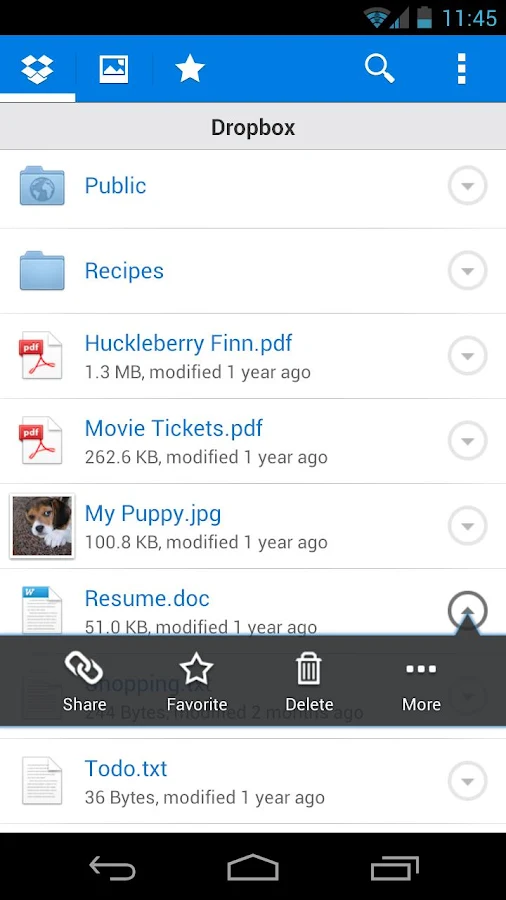
Cloud Storage - Dropbox (Free)

Cloud Storage - Dropbox (Free)
In a Lifehacker survey, Dropbox was named the most useful cloud storage app by more than half the votes. The service offers 2GB of free storage with the option to upgrade, and it has clients for almost every platform (Android, iOS, Blackberry, Windows, Mac and Web), so your documents are accessible from virtually anywhere.

Files are also stored behind an SSL and AES-256 bit encryption as well as optional two-step verification. So no one is looking at those documents but you.

Text Messages - Go SMS Pro ($1.99)


Text Messages - Go SMS Pro
Recording and documenting text messages is important for lawyers and Android's basic SMS app falls short on this front. The premium version of Go SMS Pro lets you store messages both locally and on the cloud (like a Dropbox account). So if your phone eats it, you can restore every message without a hitch. The app also carries handy features like speech-to-text and play-back when your hands are tied.


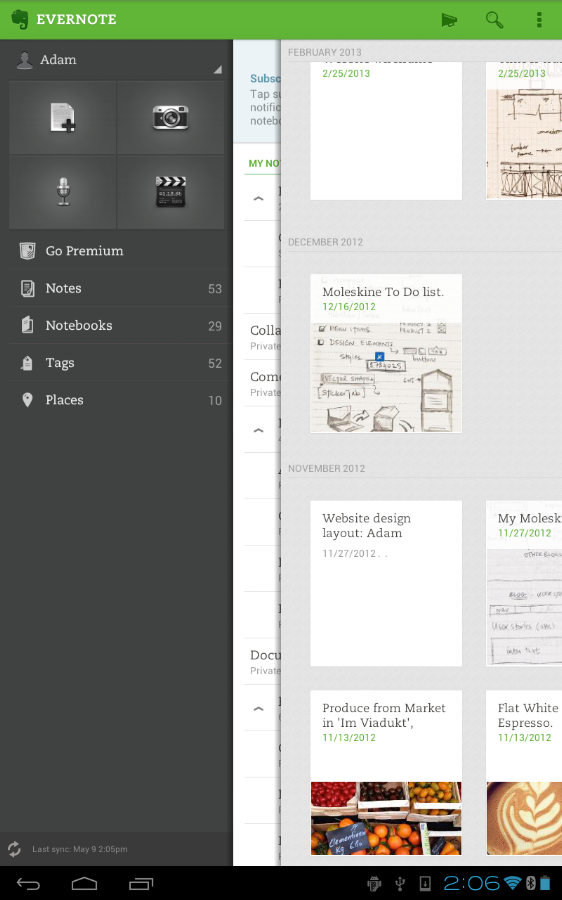
Notes - Evernote (Free)

Notes - Evernote
Like Dropbox, Evernote is the most popular and comprehensive app of its genre—it has clients across all platforms, starts you with a free account, and can organize notes with text, voice, pictures and videos. All notes are stored on your account so in case your phone is lost or stolen (and yes, it's password protected) you can still restore everything to a new device.

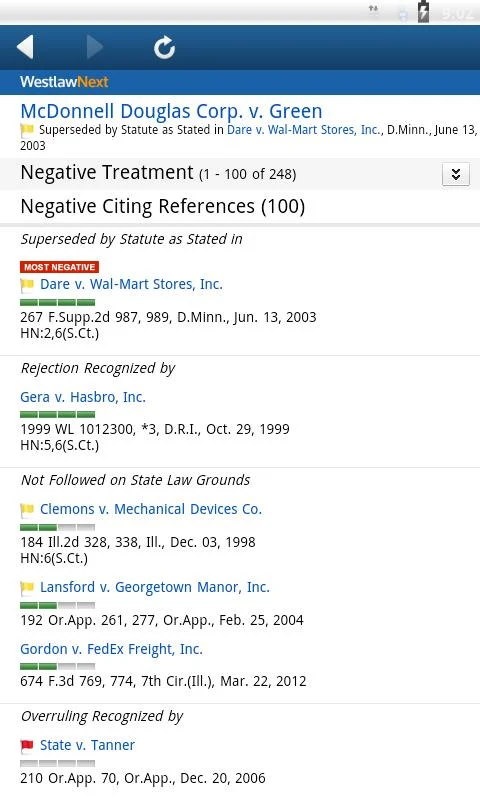
Legal Research - WestlawNext (Free With Subscription)

Legal Research - WestlawNext (Free With Subscription)

If you have a WestlawNext account, they've made an intuitive app to give you legal access on the go. There are a handful of legal research apps that yield the same info, but this one offers a better interface and usability. This makes it perfect for anyone, from a senior partner like Bob Bratt all the way down to a local county clerk.


Remote Access - LogMeIn Ignition ($29.99)

Remote Access - LogMeIn Ignition

We've featured it before, but in two years no other app comes close. Thirty bucks is a small price to pay to use a remote access app that works across all platforms and is extremely user-friendly. You can look through your home files via a directory or screen share your desktop. The free account is all you need for these features and there's just nothing else that can match this price.
Read More
Posted in android apps, apps, iphone apps | No comments

Sunday, 8 September 2013

Starting a Startup: Some of the Best of 2013

Posted on 05:42 by Unknown
These days, everyone wants to come up with a clever startup idea - especially those in the tech field. Startups can be vehicles for making millions, or even billions, but they can also crash and burn in a short period of time. The dream of making it big, however, keeps new business owners motivated.

This year’s hot startup industries include online shoe sales, translation services, social network game development, travel agencies, digital forensic services, TV and home theater installation services, and information-technology security consulting.

Treehouse, for example, offers users an affordable place to learn Web design and development, teaching students how to make iPhone and Android apps.


Storenvy is a place for sellers to create their own store and shoppers to sort through various marketplaces.

Medium was designed based on the belief that civilization moves forward when people can share ideas and experiences.

Duolingo is a website and Smartphone app that offers free foreign language lessons in Spanish, English, Italian, Portuguese, German, and French.


Pocket is an ingenious little startup that allows Web users to save anything they might find while surfing – recipes, magazine articles, news postings, or shopping sites – to look at later, on any device.

With Branch, people are encouraged to create and indulge in high quality public discourse.

Gumroad allows people who write, make movies, or create music to sell directly to an online audience.


Last but not least, Snapguide is a site where people can go to create, view, or share simple and effective how-to guides.


(Right click the below infographic and open it in new tab for better view!)

Starting a Startup: Some of the Best of 2013


Source: Business MBA Degree Guide.
Read More
Posted in Infographics, Tech | No comments

Saturday, 7 September 2013

Parental Tools For Keeping Your Child Safe Online

Posted on 09:52 by Unknown

Parental Control Software and Computer Monitoring Software
In such a short amount of time, the internet has become more common place in our lives than we could have ever imagined. Today, a world without the conveniences and the joys of the internet is unimaginable and we are learning of new ways to use and enjoy it all the time. It's practical uses are diverse: looking up directions, sending a gift, learning to play guitar, watching a film – all of these activities are things we can now do quickly and easily in the comfort of our own homes.

For our children, teaching them to use the internet effectively and safely is ever increasingly important to us as parents. The benefits of the thousands of educational resources available online massively outweighs the drawbacks of the dangers we also find on the world wide web, but those dangers do pose a problem – one that can worry parents when they're introducing there younger children to the online world. Thankfully, some savvy computer programmers have put together some brilliant tools to alleviate our concerns as parents.

Although there are a wide range of tools that can help, I'm going to concentrate on the two that I think are the most helpful. They are Parental Control Software and Computer Monitoring Software, and each of these tools can help parents in their own unique way. Let's take a look at each of these in turn.

Parental Control Software:

Parental Control Software can monitor, filter and block web pages depending on its content. If you have young children and you're worried they're going to be exposed to adult web pages of some kind (this could be gambling, alcohol, violence, pornography etc...) then this is for you. Parental Control Software will scan a web page before it is shown for a range of keywords and if it deems the page unsuitable, it will block it, if not it will show it.

Computer Monitoring Software:

Computer Monitoring Software works similarly, but slightly differently than Parental Control Software, and is great for parents of teenagers or older children who you want to give a bit more freedom online, but are still slightly worried. Computer Monitoring Software will monitor (secretly) every web page that is visited and any application used, so that you can look through reports and see what your children have been looking at at a later date. Computer Monitoring Software also monitors keystrokes and documents, and will take screen shots of visited websites.

You could even use parental control and computer monitoring software together, to create a powerful combination of tools that's sure to keep your child safe online. If you'd like to find out more about these parental tools, head over to the Gecko Parents website here.


Image Credit: Clare Bloomfield.
Read More
Posted in Security Tips, tips | No comments
Newer Posts Older Posts Home
Subscribe to: Posts (Atom)

Popular Posts

  • Download GMail Drive To Use Gmail As a Storage Medium [Freeware]
    Hai Guys, here is an amazing software to use the space (About 10GB) available on your Gmail account for storing your files and folders onlin...
  • Spider Silk: The Super Material of the Future
    Today's scientists and researchers are more advanced than they have ever been before thanks to the use of highly effective traditional ...
  • 5 Reasons To Use A Website Builder
    If you don’t have a personal website, but you’re dreaming about launching one, you’ve come to the right place. In this article I’m going to...
  • Windows 8: How To Eliminate Shut Down Problem
               Windows 8 latest operating system launched by Microsoft known for its Modern UEFI interface, windows defender with antivirus prog...
  • Samsung Galaxy S3 (Root, Recovery and Custom ROMs):
    Introduction: After the Samsung Galaxy S3 was released, there were many rooting tools introduced into the market due to its increase in dem...
  • Tips to Prevent Data Loss!
    How do you protect yourself from losing important data? Do you save your work as often as possible? Do you do backups? Here are a few effect...
  • Blogging Tools For Keyword Research
    When it comes to SEO optimization , one of the most valuable and important elements is the so-called keyword research. Search marketing fie...
  • GRAPHENE: A Material That Enabled the Creation of Flexible Smartphones
    Infographic By Quib.ly
  • How Much Is A Site Worth?
    Most buyers consider the net profit made by the website annually plus some percentage higher than this amount. Suppose, for example, a webs...
  • Tips For Protecting Your Online Intellectual Property
    What online intellectual property do I have? Whether you have a web-based business, like an e-commerce site, or a simpler online presence s...

Categories

  • android apps
  • apps
  • blogging
  • Blogging How To
  • Blogging Tips
  • Blogging Tools
  • business
  • Buying Guide
  • Cloud Computing
  • Computer Tips
  • Computer tricks
  • domain
  • Downloads
  • Earn Online
  • Facebook
  • Facebook Tricks
  • freewares
  • gadgets
  • games
  • Gaming
  • Gaming Tips
  • Gaming Tools
  • Google Glass
  • how to
  • Infographics
  • iphone
  • iphone apps
  • Mobile Tips
  • Mobile Tricks
  • Online Tips
  • Online Tricks
  • Other Tricks
  • printers
  • QR Code
  • recycle
  • review
  • Security Tips
  • seo
  • social media
  • softwares
  • Tech
  • tips
  • Tips -Computer Tips
  • tricks
  • Useful Tools
  • Web host
  • website
  • wet mobile
  • windows phone 8
  • youtube

Blog Archive

  • ▼  2013 (331)
    • ▼  December (3)
      • Spider Silk: The Super Material of the Future
      • Using iOS 7 to Optimize iPhone Security
      • Take the Facebook Timeline Cover to Extremes
    • ►  November (11)
    • ►  October (23)
    • ►  September (27)
    • ►  August (26)
    • ►  July (25)
    • ►  June (36)
    • ►  May (56)
    • ►  April (30)
    • ►  March (31)
    • ►  February (31)
    • ►  January (32)
  • ►  2012 (43)
    • ►  December (11)
    • ►  November (2)
    • ►  October (2)
    • ►  September (9)
    • ►  August (18)
    • ►  July (1)
Powered by Blogger.

About Me

Unknown
View my complete profile